Warning: Sadly this no longer works from the Things menu bar due to sandboxing. You can still run this script outside of Things, and it will work just the same. {:.warn}
Calendar blocking (the process of marking of pieces of time in your calendar to work on a given task) can be a real productivity booster. Not only does it help you in planning out your day it also creates a visible representation of what you have done in a week.
Because I already keep track of the things I want to do in the amazing task app Things3 I added a simple workflow to copy over selected todo’s to my calendar app of choice Fantastical. This keeps the content of my todo’s consistent and removes a lot of friction with daily and weekly planning.
Adding custom scripts to Things3
Things has a great option to add custom script to the menu bar of the application. This is done by:
- Quitting Things
- Creating the directory
~/Library/Application Support/Cultured Code/Things Scriptsusing the Terminal:$ mkdir ~/Library/Containers/com.culturedcode.ThingsMac/Data/Library/Application\ Support/Cultured\ Code/Things\ Scripts - Change to the dir using:
$ cd ~/Library/Containers/com.culturedcode.ThingsMac/Data/Library/Application\ Support/Cultured\ Code/Things\ Scripts - Now you can add custom scripts to this directory
Creating the script
In the directory ~/Library/Containers/com.culturedcode.ThingsMac/Data/Library/Application Support create the script addToFantastical.scpt:
(*
Purpose: Add a selected ToDo to Fantastical
2021-03-25:
  - Initial version
*)

on run
	tell application "Things3"
		set title to name of selected to dos
		set description to notes of selected to dos
		set eventLength to " 1 hour"
		set input to (title & eventLength) as string

		tell application "Fantastical"
			parse sentence input notes description
		end tell
	end tell
end run
Get a copy at GitHub
More information about adding scripts can be found on the official support page
Running the script
The script can be accessed from the things3 menu:

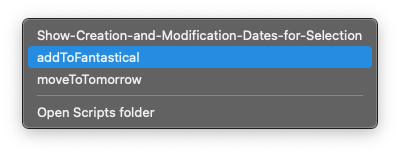
Warning: When you run these script’s for the first time macOS will ask you for permissions {:.info}
Running the script will:
- Copy the name and note of the current selected todo
- Open up Fantastical in quick add mode
- Add a event with the name of the todo using the note of the todo as extra content and will set a 1 hour duration of the event
You can customize the script if you like to change the duration of the event or to add the event to a specifiek calendar. For more information see the Dictionary page of the Fantastical app in the AppleScript editor.